
How we checked
SayDart's website and growth lead opened every source linked on this page on November 10, 2026 and compared each date and price with the source text. Dates come from Nuance reseller notices, because neither Nuance nor Microsoft had published one. Prices are US reseller list prices per user, before tax and negotiated discounts. SayDart facts were checked against the 0.1.17 release source and current service behavior on November 10, 2026. We did not re-run every step on a live 0.1.17 install.
What has been announced, and by whom
Nuance hasn't posted a retirement notice. On November 10, 2026, its Dragon Professional Anywhere and Dragon Legal Anywhere pages still described both products, including the bundled Dragon Anywhere Mobile app, and we found no end-of-sale advisory in Nuance's support knowledge base. The dates come from resellers who say they are passing on what Nuance and Microsoft told partners:
| Source | Region | Last day to buy or renew | End of life |
|---|---|---|---|
| Thax Software, authorized Nuance partner (updated October 27, 2026) | Germany | December 31, 2026 | December 31, 2027 |
| Byte Heroes (blog post dated July 15, 2026) | Germany | December 31, 2026 | December 31, 2027 |
| Idioma IT-Solutions (notice dated June 22, 2026) | Austria | December 31, 2026 | December 31, 2027 |
| VoiceX (Dragon Legal Anywhere only) | Australia and New Zealand | December 30, 2026 | December 30, 2027 (end of product support) |
| Nuance product pages | — | No date published | No date published |
Thax, Byte Heroes and Idioma list a separate, earlier retirement for Dragon Anywhere Mobile, the iOS and Android companion app: new subscriptions and renewals ended June 30, 2026, with end of life on June 30, 2027. They say the installed Windows versions, Dragon Professional 16 and Dragon Legal 16, stay on sale. Thax adds that Dragon Medical One continues.
Three partners in Germany and Austria give the same dates for both products, and VoiceX gives December 30 for Dragon Legal Anywhere in Australia and New Zealand. VoiceX says Microsoft announced that retirement in July 2026; we found no public Microsoft or Nuance notice. That is enough to plan around, but it's still a reseller account, so ask whoever bills you to confirm your contract's end date in writing.
Key dates
As reported by the resellers above. Your own contract can end earlier.
| Date | What happens |
|---|---|
| June 30, 2026 | Dragon Anywhere Mobile: last day for new subscriptions and renewals |
| December 31, 2026 | Dragon Professional Anywhere and Dragon Legal Anywhere: last day to buy or renew (December 30 for Legal Anywhere in Australia and New Zealand, per VoiceX) |
| June 30, 2027 | Dragon Anywhere Mobile: end of life |
| December 31, 2027 | Dragon Professional Anywhere and Dragon Legal Anywhere: end of life |
What it means if you use Anywhere today
- You can still renew in 2026, and Thax describes it as the last renewal. Thax and Idioma say no new subscriptions or renewals are possible after December 31, 2026, so you can't add a user in 2027.
- Your service ends when your contract says, which may be before December 31, 2027. Thax says rented licenses run at most until end of life; Idioma says customers without the mobile app who renew before the end of 2026 can keep working as usual until December 31, 2027. Get your actual end date from your reseller.
- For hosted subscriptions there is nothing left to run: Thax says rented and hosted contracts end at end of life. Organizations that bought on-premise Anywhere licenses with a maintenance contract lose maintenance and security updates instead; Thax calls running them past 2027 technically possible but not advisable.
- The mobile app is already out of new renewals. Idioma says DPA and DLA customers who renewed before June 30, 2026 keep their setup, mobile app included, until June 30, 2027; renewals after that date no longer include Dragon Anywhere Mobile.
- Nuance has no hosted successor outside healthcare. Thax says the Anywhere platform isn't being replaced by a new product; its suggestions are the installed Dragon Professional 16 and Dragon Legal 16, or Dragon Medical One for clinical users.
Dragon Professional Anywhere and Legal Anywhere pricing
Nuance doesn't show a price on either product page; it sells through resellers and sales. These are US reseller list prices per user, before tax, checked November 10, 2026:
| Product | Pay monthly (12-month term) | Pay for the year upfront | One-time setup |
|---|---|---|---|
| Dragon Professional Anywhere | $55/month (DictationOne, Voice Automated, Dictation Direct) | $660/year list (Voice Automated, DictationOne; DictationOne shows a $399.99 sale price); $600 prepaid at Dictation Direct | $175 implementation or origination fee (DictationOne, Dictation Direct) |
| Dragon Legal Anywhere | $65/month (DictationOne) | $780/year list (DictationOne; shown on sale at $699) | $175 implementation package (DictationOne) |
"Pay monthly" is not month to month. Dictation Direct states a minimum one-year term that you can cancel at the end of the term, and offers a 14-day free trial with no credit card. Outside sale prices, one Professional Anywhere seat is $600 to $660 a year and one Legal Anywhere seat is $780. Your negotiated renewal may differ, and a renewal signed now buys at most one more year.
Your options compared
Prices and features checked on each vendor's own pages on November 10, 2026. SayDart is our product.
| Option | Price | Runs on | Voice control of the PC | Custom words | Best for |
|---|---|---|---|---|---|
| Dragon Professional 16 / Dragon Legal 16 | About $699 once per user (CDW); Legal 16 $799 (DictationOne) | Windows 10 and 11, installed on each PC; recognition runs on the PC | Yes: commands, macros, Auto-Texts | Yes, and imports a Dragon word list | People who control Windows by voice or need legal citation formatting |
| Windows voice typing (Win+H) | Free, built in | Windows 10 and 11; needs internet | Basic editing commands such as "delete that" | No custom word list | An occasional sentence |
| Windows voice access | Free, built in | Windows 11; works without internet | Yes: open apps, click, navigate, dictate | "Add to vocabulary" | Hands-free control of Windows at no cost |
| Wispr Flow | Free with weekly limits; Pro $15/month or $144/year; Growth $23/user/month, or $216/user/year ($18/month) | Mac, Windows, iPhone, Android; cloud | Not listed on its features page | Personal dictionary that learns from corrections; snippets | Dictating on desktop and phone; teams that need SSO |
| SayDart | Free with a modest weekly limit; Pro $15/month, or $144/year ($12/month billed yearly) | Windows; Mac (beta, Apple Silicon); cloud | No | Dictionary that learns from your corrections; imports a CSV or TXT list | Emails, letters, notes and documents in almost any app |
Dragon 16 is licensed per person: Nuance's installation guide says each additional user must buy a separate license. Clinicians are a separate case. Thax points healthcare users of Anywhere to Dragon Medical One, Nuance's clinical product. SayDart isn't built or certified for clinical documentation.
Which way should you go?
- You open apps, select text or run step-by-step commands by voice: move to Dragon Professional 16, or Dragon Legal 16 if you need its legal vocabulary and citation formatting. You give up the hosting and the profile that followed you between PCs, and someone has to install and maintain it. Nothing else on this page replaces Dragon's command and control.
- You dictate inside Citrix, VMware or Remote Desktop sessions: Anywhere and Dragon 16 are documented for those setups. That favors Dragon. Pilot any other tool inside your actual session before you commit.
- You need hands-free control but can't justify a license: try Windows voice access on Windows 11 first. It's free and works offline.
- You mostly dictate prose and fix things with the keyboard: a dictation app is enough, for $144 a year. SayDart and Wispr Flow both charge that ($15 a month if you pay monthly), and both have a free tier to test with.
- You also dictate on your phone: Wispr Flow has iPhone and Android apps. SayDart is desktop only.
- IT needs central licensing, SSO or managed deployment: SayDart has none of these. Wispr Flow's Growth and Enterprise plans list SSO and admin controls; Dragon 16 has the Nuance Management Center.
Where SayDart fits, and where it doesn't
SayDart is a dictation app for Windows and Mac (beta, Apple Silicon). Click into a text field, press Right Alt (Right Option on Mac), talk, and the text lands at your cursor. You don't learn commands and you don't say "comma" or "period": AI text cleanup, on by default, adds punctuation, restores sentence boundaries and drops filler words and restarts.
Its Dictionary holds the names and terms you want spelled your way, and syncs to every computer you sign in to. When you make a small correction to text SayDart has just inserted in the same field, within about a minute, Cloud learning may pick up the word and show a "Learned a new term" notice. Cloud learning is on by default and you can turn it off. Snippets insert saved text, such as a signature or a standard paragraph, when you say its trigger phrase.
- No voice commands or voice editing, apart from saying a Snippet's trigger phrase. You can't open apps, click, select, or say "delete that" or "scratch that"; you edit with the keyboard and mouse.
- No built-in legal vocabulary or citation formatting. Add case names, parties and terms to the Dictionary yourself.
- Not specifically adapted for remote desktop or virtual desktop sessions.
- No enterprise deployment, admin console, SSO or team plan.
- No mobile app and no offline mode. Recognition runs in the cloud, so you need an internet connection.
- No transcription of recorded audio files.
SayDart is free to start. Pro is unlimited for $12/month, billed yearly ($144), or $15 month to month. Prices exclude tax. SayDart doesn't claim HIPAA or other compliance certifications, so follow your organization's rules on what you dictate.
How to move your custom words from Dragon
- Export while your subscription is still active. In a managed deployment, ask your administrator to export your words from the Nuance Management Center (select the words, then Export Words). Thax notes that custom words export cleanly but custom commands and Auto-Texts don't carry over to other products.
- Clean up the file. A Dragon word list is plain text with a header line (@Version=Plato-UTF8) and one entry per line. Some entries carry a spoken form after two backslashes, written form first. Delete the header and drop words you no longer use, leave only the written form on each line, then import as TXT or paste; review the preview and uncheck any leftover junk. SayDart stores the spelling you want, not a pronunciation.
- Import it into SayDart. Open Dictionary > More actions > Import terms and choose the .txt or .csv file, or paste the list. A .txt file is read as one term per line (commas stay inside the term; empty lines are skipped); for a .csv, pick the column that holds the terms. One import takes up to 1,000 non-empty records and 1 MiB. You can later use Export active terms as CSV.
- Turn entries whose written form differs from what you say into Snippets, and rebuild the text you insert every week the same way: sign-offs, standard paragraphs, an address block. Write down any multi-step commands you depend on; those need keyboard shortcuts, or Dragon 16.
- Run both side by side before your renewal date. For a week, dictate the things you actually wrote last week, in the same apps and with the same microphone. Each time you fix a word by hand, add it to the Dictionary and mark it on a tally; switch when the tally stops growing.
- Decide person by person, not for the whole firm. Whoever drives Windows by voice can take the 2026 renewal or move to Dragon 16; colleagues who mostly dictate prose don't have to wait for the renewal date.
Example: a Dragon word list before and after cleanup
We made a sample word list in the format Nuance documents for Dragon imports (a header line, one entry per line, an optional spoken form after two backslashes) and cleaned it as described above. The entries are invented, not taken from a customer.
| Line in the Dragon file | What to do with it in SayDart |
|---|---|
| @Version=Plato-UTF8 | Delete it. It's the file header, not a word. |
| Okonkwo | Keep as is and import it as a Dictionary term. |
| Hargreaves v. Linley | Keep as is and import it as a Dictionary term. |
| MB\\megabyte | Don't import it as a term. Make a Snippet: trigger phrase "megabyte", expanded text "MB". |
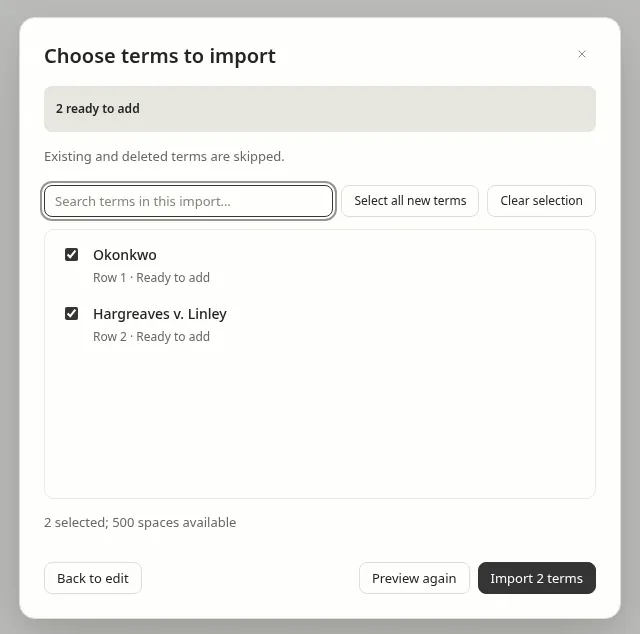
Watch for entries like MB\\megabyte, where the written form isn't what you say. Keeping only "MB" in the Dictionary won't make SayDart write "MB" when you say "megabyte". A Snippet will: open Snippets, choose New snippet, put the old spoken form in Trigger phrase and the written form in Expanded text. For a long list, use Import on the Snippets page. It takes a CSV whose header has a trigger column and a replacement column (text or expansion are also accepted as the replacement heading), or a JSON array of snippets. Existing triggers are skipped. Each file can be up to 1 MiB; each trigger up to 128 characters and each expanded text up to 20,000; an account can hold 500 snippets.
A trigger matches as a whole word or phrase, case-insensitively, including in the middle of a sentence, after AI text cleanup. If you dictate only the trigger, the whole result becomes the expanded text. Try it once, because cleanup can change the wording around a mid-sentence trigger.
Snippets are saved to your signed-in account and sync across computers. A signed-in account is required; a Pro plan is not. The cap is 500 snippets.
One year per seat, at list price
Before tax and negotiated discounts. The Anywhere rows are what a final 2026 renewal costs, not a long-term option.
| Option | First year | Notes |
|---|---|---|
| Dragon Professional Anywhere | $600–$660 | $55 × 12, or $600 prepaid at Dictation Direct; $399.99 on sale at DictationOne; plus $175 setup for a new account |
| Dragon Legal Anywhere | $780 | $65 × 12; plus $175 setup for a new account |
| Dragon Professional 16 | About $699 | One-time license per user |
| Dragon Legal 16 | $799 | One-time license per user |
| Windows voice typing or voice access | $0 | Built into Windows |
| Wispr Flow Pro | $144 yearly, or $180 paid monthly | Free tier has weekly limits |
| SayDart Pro | $144 yearly, or $180 paid monthly | Free plan has a modest weekly limit |